上一节中,我们的基本已经完成了游戏过程的交互控制,本节需要实现的计分逻辑:
- 每一帧渲染,分数
+10;
- 分数每增加 2000,速度
+0.02;
- 游戏结束,停止计分。
逻辑本身并不难,但是渲染方面需要考虑几个问题:
- Threejs 需要额外加载字体文件去渲染文本;
- 分数元素可能被其他元素遮挡的问题;
- 分数刷新频率高,需要考虑渲染性能问题。
为了尽量压缩小游戏的体积包,我们基本不会考虑字体文件,需要换种方式实现,即使用纹理贴图,然后借鉴跑道的纹理贴图更新的方式,只修改贴图的偏移量实现分数的刷新,大概的实现流程如下:

预渲染
首先我们需要准备一张带有 0 到 9 的数字精灵图,并且是数值排列的:

首先新增一个Score类,并创建 render 方法,我们的目的是用数字精灵图是实现数字的渲染,首选,我们需要创建一个平面模型,然后贴图使用加载好的精灵贴图,注意需要设置repeat值为(1, 0.1)来裁剪精灵图,关键代码如下:
1
2
3
4
5
6
7
8
9
10
11
12
13
14
15
16
17
18
19
20
21
22
23
24
25
26
27
|
const texture = new THREE.Texture(img);
texture.needsUpdate = true;
texture.repeat.set(1, 0.1);
texture.offset.y = 0.9;
texture.minFilter = THREE.NearestFilter;
const geometry = new THREE.PlaneGeometry(numberWidth, numberHeight);
const material = new THREE.MeshBasicMaterial({
map: texture,
transparent: true,
});
const mesh = new THREE.Mesh(geometry, material);
const group = new THREE.Group();
scoreNumberArray.forEach((item, i) => {
const newMaterial = material.clone();
const newMesh = mesh.clone();
newMaterial.map = texture.clone();
newMaterial.map.needsUpdate = true;
newMesh.material = newMaterial;
newMesh.visible = false;
newMesh.position.set(numberWidth * i - totalWidthHalf + numberWidth / 2, SCORE.y, 0);
group.add(newMesh);
});
|
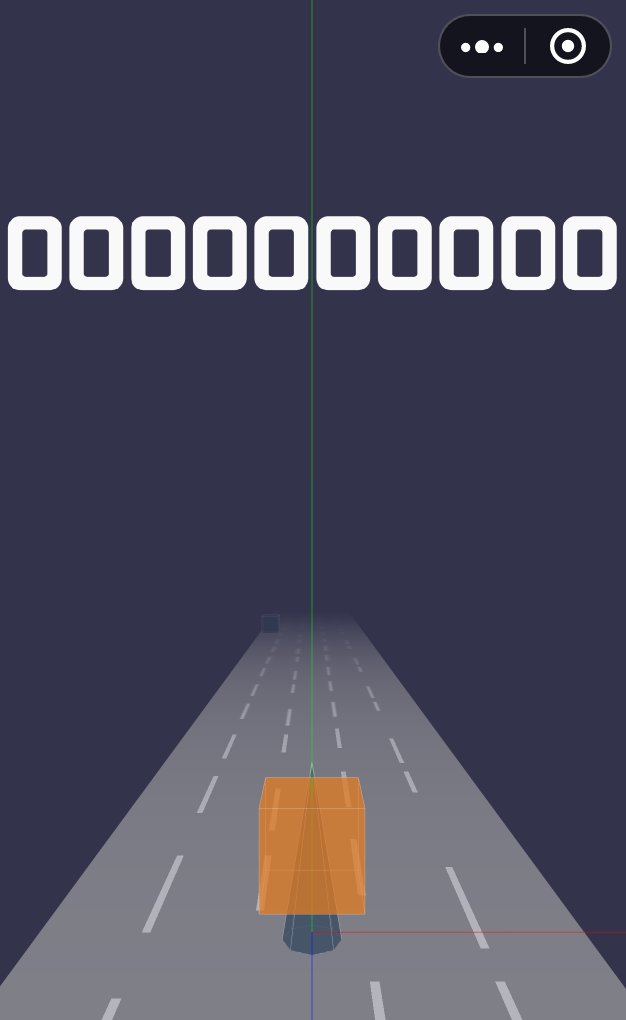
我们可以看到,默认的分数000000000预渲染已经成功添加到舞台了:
添加顶层 Scene
用 Threejs.js 创建的元素,添加到 scene 中,默认是按照添加的顺序决定元素显示的层级的,关于如何解决显示的优先级问题,有两种方案:
- 有一种方式是设置 renderer 渲染器的
sortObjects: false(默认为 true),然后再去设置具体元素的renderOrder,值越大显示的层级越高,类似于 CSS 的z-index。
- 添加顶层 Scene,用于放置分数、菜单等需要在顶层显示的元素。
这个游戏采用了第二种方案,毕竟维护游戏元素一多,维护 renderOrder 是很头疼的一件事情。首先我们新建一个舞台topScene:
1
| export const topScene = new THREE.Scene();
|
需要注意的是,renderer 渲染器渲染两个舞台时,第二个舞台会清除掉第一个舞台,所以我们要设置渲染器的autoClear为false:
1
| renderer.autoClear = false;
|
另外设置元素depthTest 为false,表示不启用深度测试。最后再用 renderer 渲染topScene即可:
1
2
3
| this.renderer.clear();
this.renderer.render(this.scene, this.camera);
this.renderer.render(this.topScene, this.camera);
|
更新分数
我们设定每帧+10的分数,所以在Game模块的 ticker 方法新增一个count方法,用来调用Score类更新分数:
1
2
3
4
5
6
7
8
9
10
11
|
private count() {
if (this.isPlaying) {
this.score.update();
}
}
public update() {
this.value += 10;
}
|
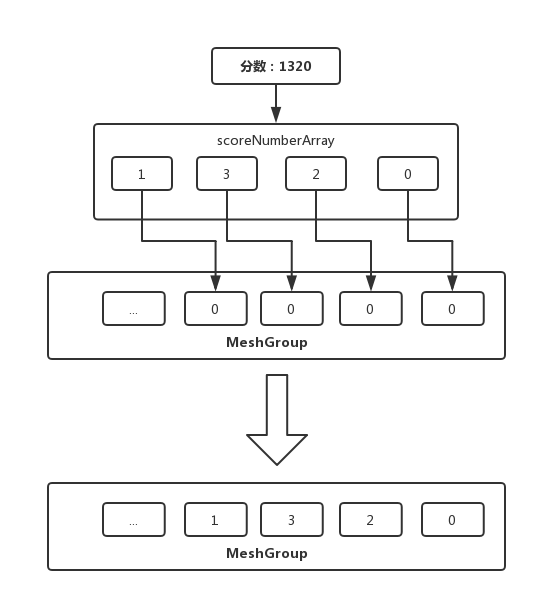
接下来我们要设置纹理贴图的偏移量,以实现数字贴图的更新,主要逻辑是把分数转换了数组,然后遍历数组,逐个去更新贴图的offset.y,并把元素设置为可见:
1
2
3
4
5
6
7
8
9
10
11
12
13
14
15
|
const score = this.value.toString();
const scoreNumberArray = score.split('');
const meshList = this.mesh.children;
for (let i = scoreNumberArray.length - 1; i >= 0; i -= 1) {
const number = Number(scoreNumberArray[i]);
const mesh = meshList[i];
const map: THREE.Texture = mesh['material'].map;
mesh.visible = true;
map.offset.y = 1 - (number + 1) * 0.1;
}
const meshWidthHalf = (meshList.length * numberWidth) / 2;
const scoreWidthHalf = (scoreNumberArray.length * numberWidth) / 2;
this.mesh.position.x = meshWidthHalf - scoreWidthHalf;
|
最后我们需要实现一下分数每 +2000,游戏速度提升0.02,初始速度为0.3,上限是0.7,实现并不难,在计算分数的时,满足以下公式时:速度递增 0.02:
分数 % 2000 === 0
对应的代码:
1
2
3
| if (this.value % 2000 === 0) {
this.game.speed += 0.02;
}
|
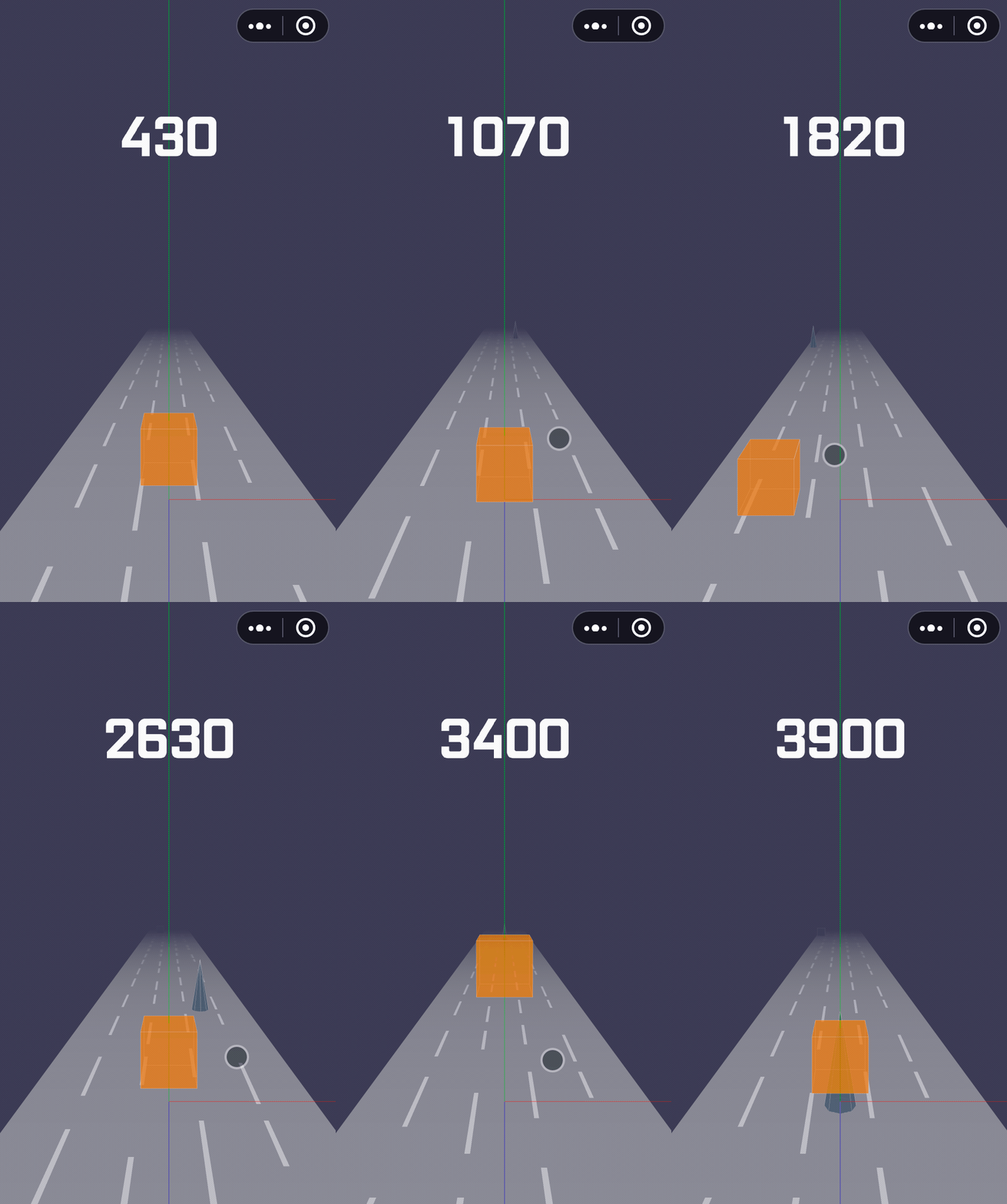
至此,我们的游戏计分模块已经完成,我们来看一下效果:
总结
这一节内容比较少,主要难点在于如何使用贴图代替字体做渲染,对于更新贴图的算法逻辑应该还可以再优化,暂时没找到更好的方式,如果你有好的建议,欢迎提出。详细的项目结构如下:
1
2
3
4
5
6
7
8
9
10
11
12
13
14
15
16
17
18
19
20
21
22
23
24
25
26
27
28
29
30
31
32
33
34
35
| ./src
├── Game
│ ├── Gamepad // 游戏手柄
│ │ └── index.ts
│ ├── NPC // NPC角色
│ │ ├── box.ts // 正方形
│ │ ├── cone.ts // 锥形
│ │ └── index.ts
│ ├── Player // 游戏主角
│ │ └── index.ts
│ ├── Pool // 对象池
│ │ └── index.ts
│ ├── Racetrack // 跑道
│ │ └── index.ts
│ ├── Score // 分数
│ │ └── index.ts
│ ├── camera // 摄影机
│ │ └── index.ts
│ ├── constant.ts // 常量
│ ├── helper
│ │ ├── axes.ts // 辅助坐标系
│ │ └── orbitControls.ts // 摄影机轨道控制器
│ ├── index.ts
│ ├── renderer // WebGL渲染器
│ │ └── index.ts
│ ├── scene // 场景
│ │ └── index.ts
│ └── util // 工具
│ └── index.ts
├── index.ts // 入口
└── lib
├── weapp-adapter-extend // weapp-adapter的扩展,新增window的方法
│ ├── index.js
│ └── window.js
└── weapp-adapter.js // 模拟BOM,DOM
|
代码::https://github.com/inarol/rungame/tree/section4
[本文谢绝转载,谢谢]